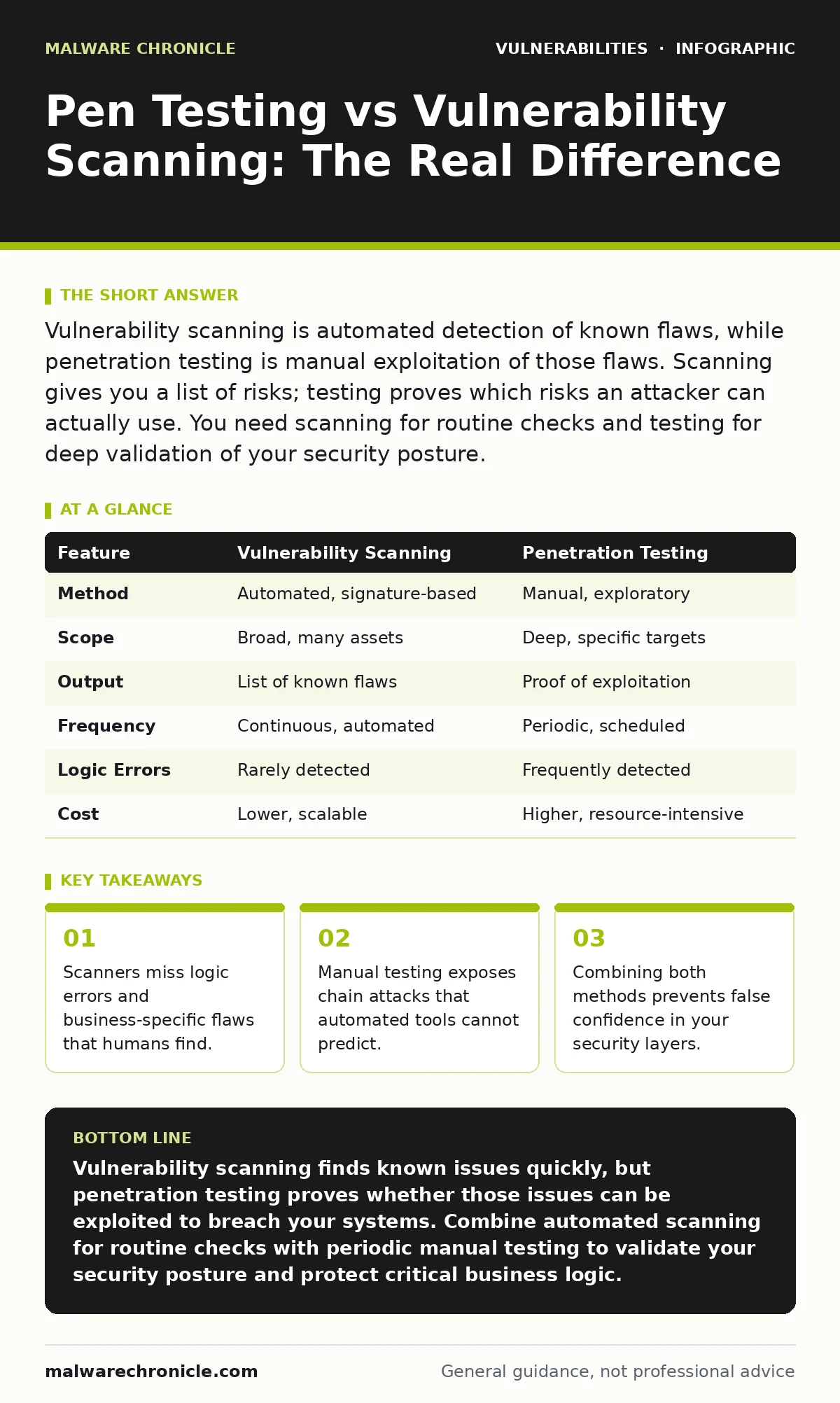
Vulnerability scanning is automated detection of known flaws, while penetration testing is manual exploitation of those flaws. Scanning gives you a list of risks; testing proves which risks an attacker can actually use. You need scanning for routine checks and testing for deep validation of your security posture.
What is the difference between pen testing and vulnerability scanning?
Vulnerability scanning is an automated process that checks systems against databases of known flaws, while penetration testing is a manual simulation of an attack to exploit those flaws. Scanning answers whether a system matches a known bad pattern. Testing answers whether an attacker can breach your defenses. You use scanning to find candidates for risk. You use testing to confirm which candidates are dangerous.
How do vulnerability scanners actually work?
Scanners operate by sending specific requests to your servers and analyzing the responses. They compare these responses against large databases of known vulnerabilities, such as missing patches or default configurations. This process is fast and covers a wide surface area. It identifies security misconfigurations quickly. It does not understand the context of your application logic. It only knows what the response looks like, not what the response means for your business.
Why do scanners miss critical application flaws?
Automated tools struggle with stateful logic and complex user interactions. They treat every page as an isolated entity. They cannot understand that a specific sequence of actions, like changing a price before checkout, creates a vulnerability. This limitation means business logic errors remain hidden. Developers often trust scanners to find everything. This trust creates a false sense of security. The scanner reports the server is patched, but the application flow remains broken.
What can a penetration tester find that a scanner cannot?
A human tester explores the system like an attacker would, chaining multiple small issues into a significant breach. They identify clickjacking opportunities that require visual inspection. They test for social engineering vectors that technology cannot detect. They examine how different components interact. A scanner sees three separate low-risk issues. A tester sees how those three issues combine to allow remote code execution. The human element provides context and creativity that scripts lack.
When should you use automated scanning instead of manual testing?
Use scanning for continuous, routine monitoring of your infrastructure. It is ideal for checking if recent firmware updates were applied correctly. It helps track compliance requirements and baseline security standards. You run scanners after every code deployment to catch obvious regressions. It is cost-effective for large environments with many assets. It provides a rapid overview of your current exposure. It flags issues that need immediate attention before a deeper review.
See also: Authorization Bypass Myths: Why Common Security Beliefs Fail · What Is Static Application Security Testing: Code Scans That Find Bugs Before Build
When is manual penetration testing the right choice?
Choose manual testing when you launch new features or change core business logic. It is necessary when automated tools report conflicting results. You need it to validate the effectiveness of your configuration hardening efforts. Manual testing is required for high-value applications where business impact is severe. It helps you understand the real-world exploitability of findings. It provides detailed remediation advice that considers your specific architecture. It answers the question of whether an attacker can actually cause harm.
How do you combine both methods for maximum security?
Start with a comprehensive scan to identify potential entry points. Use the scan results to prioritize which areas need manual testing. Focus human effort on complex logic and critical data flows. Use manual findings to refine your scanning rules and filters. This layered approach ensures you catch both known signatures and novel attacks. It reduces the noise from false positives. It provides a complete picture of your risk landscape.
| Feature | Vulnerability Scanning | Penetration Testing |
|---|---|---|
| Method | Automated, signature-based | Manual, exploratory |
| Scope | Broad, many assets | Deep, specific targets |
| Output | List of known flaws | Proof of exploitation |
| Frequency | Continuous, automated | Periodic, scheduled |
| Logic Errors | Rarely detected | Frequently detected |
| Cost | Lower, scalable | Higher, resource-intensive |
What are the hidden costs of relying only on scanners?
The biggest cost is the illusion of security. Teams believe they are safe because the scanner shows no high-severity issues. This complacency leads to neglected patching and poor hygiene. It delays the discovery of complex vulnerabilities. It wastes resources fixing low-risk items while critical logic flaws remain. You also face the cost of tuning scanners to reduce false positives. Maintaining these rules requires constant attention and expertise. Ignoring manual validation leaves your most valuable assets exposed to sophisticated attackers.
How do you prioritize findings from both sources?
Rank findings by exploitability and business impact. A scanner finding on an internal, isolated server is lower priority than a manual finding on a public-facing login page. Consider the effort required to exploit the flaw. Look at the data exposed if the flaw is exploited. Use a risk matrix to decide what to fix first. Address critical manual findings immediately. Schedule scanner findings based on their severity and ease of repair. This approach ensures you protect your most important assets first.
What is the role of regular updates in this strategy?
Regular updates reduce the number of known vulnerabilities a scanner finds. This includes browser updates for client-side security and automatic software updates for servers. However, updates do not fix logic errors or configuration mistakes. They only patch known code flaws. You still need manual testing to ensure your application logic remains secure. You still need scanning to verify that updates were applied correctly across all systems. Updates are a baseline, not a complete solution.
How does this relate to other security practices?
Vulnerability scanning and testing complement other security measures. They work alongside router vulnerabilities mitigation to secure network edges. They support the goal of keeping firmware updates current on all devices. They help identify security misconfigurations that arise from complex setups. This guide focuses on detection, but prevention requires a broader strategy. Understanding the difference between scanning and testing helps you allocate resources effectively. It ensures you are not just finding flaws, but understanding their real impact on your systems.
Key takeaways
- Scanners miss logic errors and business-specific flaws that humans find.
- Manual testing exposes chain attacks that automated tools cannot predict.
- Combining both methods prevents false confidence in your security layers.
Vulnerability scanning finds known issues quickly, but penetration testing proves whether those issues can be exploited to breach your systems. Combine automated scanning for routine checks with periodic manual testing to validate your security posture and protect critical business logic.
Frequently asked questions
Can I replace penetration testing with advanced vulnerability scanners?
No, scanners cannot replicate human reasoning or exploit complex business logic flaws that require understanding context and intent.
How often should I perform vulnerability scanning?
Run automated scans continuously or after every deployment to catch new issues immediately and maintain a baseline of security.
Is penetration testing safe for production environments?
It can be risky if not planned carefully, so always coordinate with your team and limit the scope to avoid disrupting live services.
What is the first step in starting a vulnerability management program?
Begin by identifying your critical assets and running a baseline scan to understand your current exposure and known vulnerabilities.
How this guide was produced: written by the Malware Chronicle editorial team with AI assistance, checked against the public references listed below, and reviewed when the facts change. See our editorial policy or report an error.