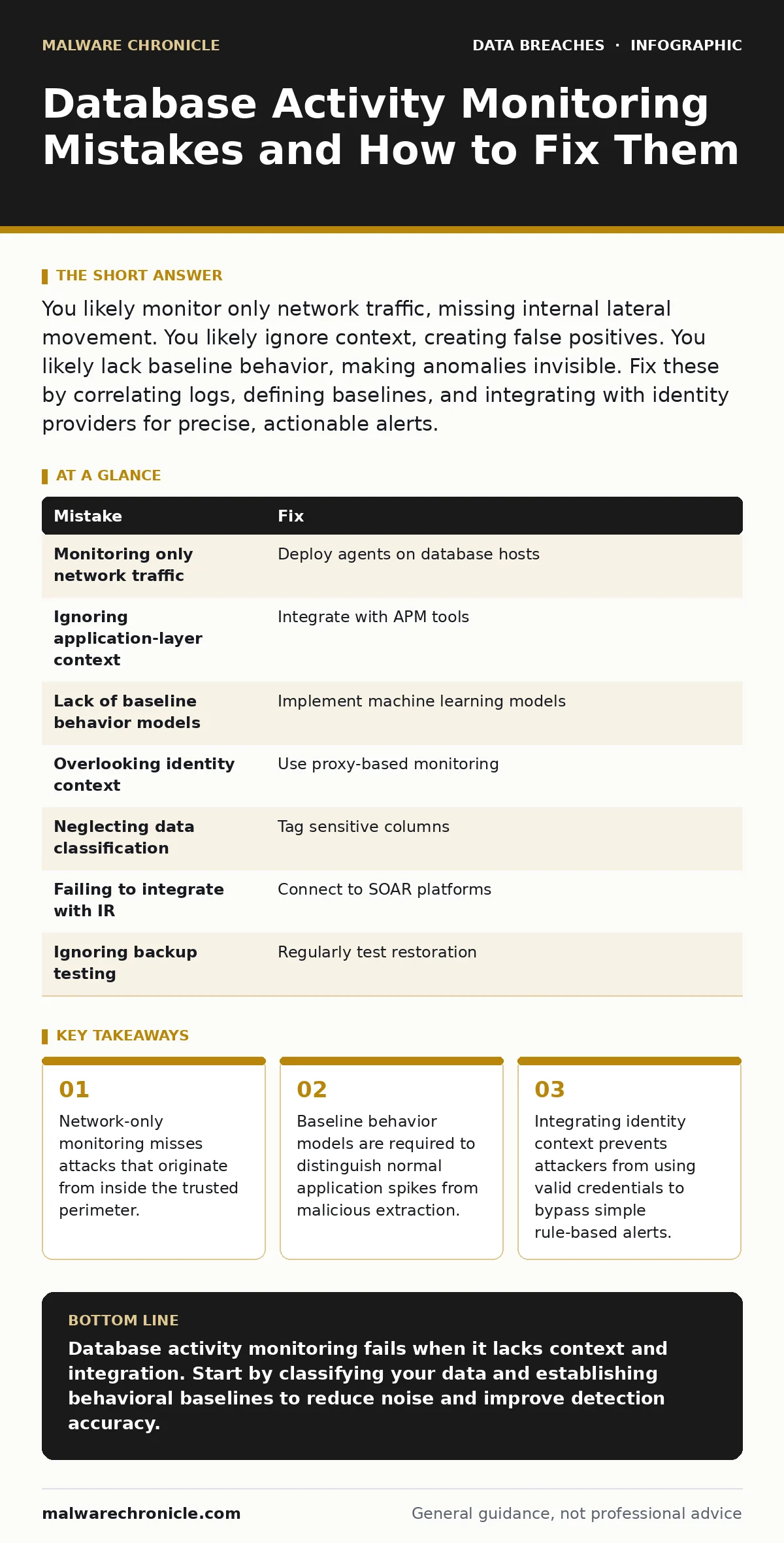
You likely monitor only network traffic, missing internal lateral movement. You likely ignore context, creating false positives. You likely lack baseline behavior, making anomalies invisible. Fix these by correlating logs, defining baselines, and integrating with identity providers for precise, actionable alerts.
Mistake 1: Monitoring Only Network Traffic
Database activity monitoring often focuses exclusively on SQL traffic crossing network boundaries. This approach assumes that all threats arrive from outside the organization. It ignores the reality that attackers frequently compromise an application server first. Once inside the trusted network segment, they can query the database directly without triggering network-based intrusion detection systems. The traffic looks like legitimate local communication because it stays within the internal subnet.
Why it hurts: Internal lateral movement becomes invisible to network-centric tools. An attacker who compromises a web server can execute arbitrary queries against the database. These queries never traverse a firewall or a network sensor. You see normal application performance metrics, but the underlying data is being exfiltrated. The monitoring tool reports zero threats because the traffic never left the secure zone. This blind spot allows attackers to operate freely for weeks or months.
The fix: Deploy agents or sidecar proxies directly on the database hosts or application servers. These components capture queries at the source, regardless of the network path. They inspect the content of the SQL statements before they reach the storage engine. This ensures visibility into local connections and internal API calls. You gain complete coverage of all query execution, not just those crossing network boundaries.
Mistake 2: Ignoring Application-Layer Context
Many monitoring solutions treat every SQL query as an isolated event. They check for known malicious patterns like injection strings. They fail to consider the application logic that generated the query. An application might legitimately execute complex joins or bulk updates during batch processing. Without context, these legitimate operations look like data exfiltration or privilege escalation attempts. The monitoring system generates alerts for normal business processes, leading to alert fatigue.
Why it hurts: Security teams become desensitized to alerts. When every batch job triggers a warning, operators start ignoring notifications. Real attacks hide among the noise of legitimate high-volume operations. Attackers exploit this by mimicking normal application behavior. They execute small, frequent queries that blend in with the expected traffic pattern. The monitoring system sees the volume as normal and the syntax as clean. The attack succeeds because the tool lacks the context to distinguish intent.
The fix: Integrate your monitoring solution with application performance management tools. Map database queries to specific application functions and user sessions. Define expected behavior for each application component. If a web server usually reads user profiles, it should not be running administrative commands. Context-aware monitoring correlates the source application, the user identity, and the query type. This reduces false positives and highlights truly anomalous behavior.
Mistake 3: Lack of Baseline Behavior Models
Static rules cannot capture the dynamic nature of modern applications. Rules that flag queries with more than 10,000 rows might block legitimate reporting jobs. Rules that flag off-hours access might trigger during global team collaboration. Without a baseline of normal activity, you cannot identify deviations. You are guessing what is malicious based on generic heuristics. This leads to either excessive blocking or missed detections. The system lacks the historical data needed to learn what "normal" looks like for your specific environment.
Why it hurts: You miss subtle attacks that do not match known signatures. An attacker who steals credentials can use them during normal business hours. They can execute queries that look syntactically correct. Static rules do not trigger because the syntax is valid and the timing is acceptable. The attack succeeds because it mimics the behavior of a legitimate user. Your monitoring system has no reference point to compare this activity against. You lack the statistical evidence to flag the anomaly.
The fix: Implement machine learning models that establish baselines for each user and application. These models track query volume, timing, and complexity over time. They learn the normal patterns of your database usage. When activity deviates significantly from the baseline, the system raises an alert. This detects new types of attacks that do not match known signatures. You gain the ability to spot unusual behavior even when the syntax is perfectly valid.
Mistake 4: Overlooking Identity and Privilege Context
Monitoring often focuses on the database account used for the connection. It ignores the human user or service account behind that connection. Many applications use a single shared database account for all users. When a query executes, the monitoring tool sees the shared account. It cannot determine which human user initiated the request. This makes it impossible to enforce least privilege at the database level. An attacker who compromises any user account gains the same broad access.
Why it hurts: You cannot attribute actions to specific individuals. When a data breach occurs, you cannot determine who accessed the data. You cannot revoke access for a specific user because the database does not know who they are. Attackers exploit this by using compromised credentials to access sensitive data. The monitoring system sees a valid login and a valid query. It has no way to link the activity to a specific person or role. This lack of granularity prevents effective incident response and compliance reporting.
The fix: Use proxy-based monitoring or application-layer tagging to inject identity information into the database session. The proxy intercepts the connection and maps the application user to the database session. It passes this identity context to the database engine. The monitoring tool can now see which human user executed each query. This enables fine-grained access controls and precise auditing. You can restrict access based on individual user roles rather than broad application permissions.
Mistake 5: Neglecting Data Classification
Monitoring every column in every table creates massive log volumes. Most of this data is not sensitive. Treating all data equally wastes storage and processing power. It also dilutes the focus of your security team. They spend time investigating alerts on non-sensitive data. Meanwhile, attacks on critical information go unnoticed. Without data classification, you do not know which queries matter most. You lack the prioritization needed to respond effectively to threats.
Why it hurts: Your security team is overwhelmed by irrelevant alerts. They spend hours investigating queries on public marketing data. They miss the subtle exfiltration of sensitive personal data. The cost of storage for logging all activity becomes prohibitive. You may need to upgrade infrastructure to handle the volume. This distracts from the primary goal of protecting critical assets. You are monitoring everything, which means you are monitoring nothing effectively.
The fix: Classify your data based on sensitivity and regulatory requirements. Tag columns containing sensitive personal data or financial records. Configure your monitoring tool to focus on these tagged columns. Reduce logging for low-risk data. Prioritize alerts that involve high-value assets. This approach reduces noise and focuses resources on what matters. You achieve better protection for your most critical data without overwhelming your team.
See also: Encryption at Rest vs In Transit: Core Differences and Selection Criteria · What Is Whole Disk Encryption: How It Protects Your Data
Mistake 6: Failing to Integrate with Incident Response
Monitoring tools often operate in isolation. They generate alerts but do not connect to your incident response workflows. Security analysts must manually investigate each alert. This slows down response times. Attackers can continue their activity while you investigate. The lack of automation means that containment actions are delayed. You miss the window to stop data exfiltration. The monitoring tool becomes a passive logger rather than an active defender.
Why it hurts: Response times increase significantly. Manual investigation takes time and resources. Attackers exploit this delay to steal more data. The longer they remain undetected, the greater the damage. You lack the ability to automatically block malicious sessions. You must rely on human intervention to stop the attack. This creates a bottleneck in your security operations. The monitoring tool fails to provide real-time protection.
The fix: Integrate your monitoring solution with your security orchestration, automation, and response platform. Define automated playbooks for common attack patterns. If a query matches a known exfiltration pattern, the system can automatically block the session. It can notify the security team and isolate the affected host. This reduces response times from hours to seconds. You gain the ability to stop attacks in real-time.
Mistake 7: Ignoring Backup and Recovery Testing
Monitoring detects attacks, but it does not prevent data loss. If an attacker encrypts or deletes data, you need backups to recover. Many organizations monitor activity but neglect to test their backups. They assume backups are valid without verification. When a ransomware attack occurs, they find their backups are corrupted or incomplete. They cannot restore their database. The monitoring system alerted them to the attack, but they had no way to recover.
Why it hurts: You face total data loss. Monitoring alerts you to the breach, but you cannot restore your operations. The cost of downtime exceeds the cost of the attack. You may be forced to pay a ransom. Your business continuity is compromised. The monitoring investment is wasted if you cannot recover your data. You lack the resilience needed to survive a successful attack.
The fix: Regularly test your backup restoration process. Verify that backups are complete and uncorrupted. Practice restoring databases from backups in a isolated environment. Ensure that your backup strategy includes point-in-time recovery. This allows you to restore data to a state before the attack. Combine monitoring with robust backup testing to ensure full resilience.
| Mistake | Fix |
|---|---|
| Monitoring only network traffic | Deploy agents on database hosts |
| Ignoring application-layer context | Integrate with APM tools |
| Lack of baseline behavior models | Implement machine learning models |
| Overlooking identity context | Use proxy-based monitoring |
| Neglecting data classification | Tag sensitive columns |
| Failing to integrate with IR | Connect to SOAR platforms |
| Ignoring backup testing | Regularly test restoration |
Key takeaways
- Network-only monitoring misses attacks that originate from inside the trusted perimeter.
- Baseline behavior models are required to distinguish normal application spikes from malicious extraction.
- Integrating identity context prevents attackers from using valid credentials to bypass simple rule-based alerts.
Database activity monitoring fails when it lacks context and integration. Start by classifying your data and establishing behavioral baselines to reduce noise and improve detection accuracy.
Frequently asked questions
Does database activity monitoring protect against encryption at rest?
No, monitoring tracks queries and access patterns. Encryption at rest protects stored data from physical theft or unauthorized file access. You need both measures for complete protection.
Can monitoring detect password leaks?
Monitoring can detect the use of leaked credentials if they are used to connect to the database. It does not prevent the initial leak. You must monitor for known compromised credentials in your identity systems.
How does this relate to credential dumps?
If attackers obtain credential dumps, they can use them to access your database. Monitoring helps detect these logins if they deviate from normal behavior or access sensitive personal data.
Is tokenization a replacement for monitoring?
Tokenization replaces sensitive data with non-sensitive equivalents. It reduces the value of stolen data. Monitoring is still needed to detect unauthorized access attempts and ensure compliance.
How this guide was produced: written by the Malware Chronicle editorial team with AI assistance, checked against the public references listed below, and reviewed when the facts change. See our editorial policy or report an error.