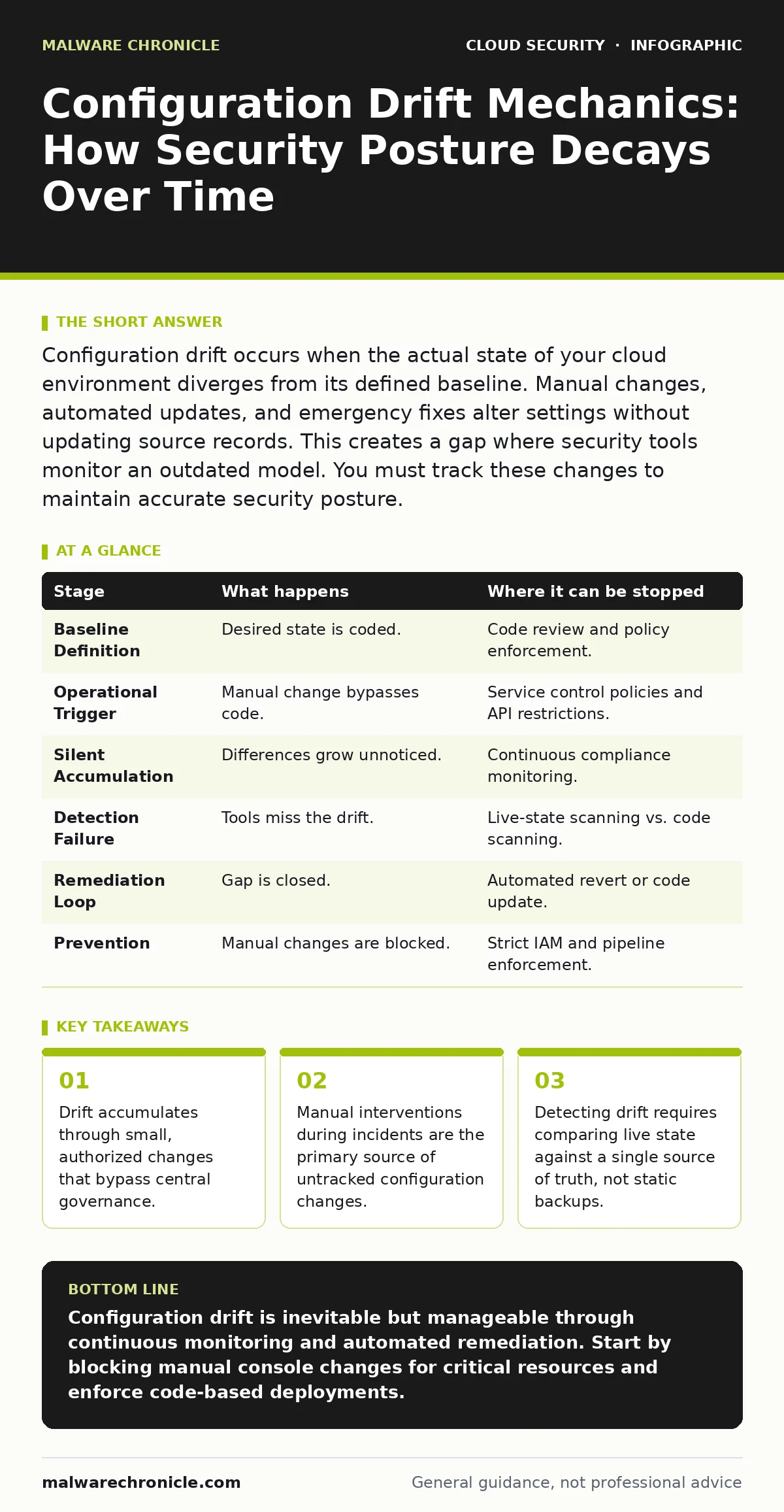
Configuration drift occurs when the actual state of your cloud environment diverges from its defined baseline. Manual changes, automated updates, and emergency fixes alter settings without updating source records. This creates a gap where security tools monitor an outdated model. You must track these changes to maintain accurate security posture.
The Anatomy of Configuration Divergence
Configuration drift begins with a single authorized change that is not recorded in your source control. Imagine a developer opens a firewall port to debug a service. The fix works. The port remains open. The infrastructure-as-code scanning tool runs nightly but only checks the repository, not the live environment. The repository says the port is closed. The live system says it is open. Your security policy is now invalid. This divergence is not a bug in your software. It is a failure in your state management process. The risk grows as each new change builds on the previous unrecorded one.
Stage 1: The Baseline Definition
Stage 1: Establishing the Single Source of Truth
You define your desired state using infrastructure-as-code. This code specifies exact versions, permissions, and network rules. This baseline is your anchor. If you do not define a baseline, you cannot measure drift. You must treat this code as the legal definition of your environment. Any deviation is a violation. This step requires discipline. You must refuse to accept manual changes as permanent. Every change must be reflected in the code. This creates a verifiable record. It allows you to audit who changed what and why. Without this, you are flying blind.
Stage 2: The Operational Trigger
Stage 2: Identifying the Catalyst for Change
Drift is triggered by operational necessity. A service fails. A security patch is applied. A new team member needs access. These events require immediate action. The operator makes a direct API call or uses a console button. This bypasses the deployment pipeline. The change is immediate and effective. It solves the immediate problem. It creates a long-term risk. The operator forgets to update the code. The code remains static. The environment moves forward. This gap widens with every incident. You must recognize that speed often trumps process in crisis moments. This is human nature. Your systems must account for this behavior.
Stage 3: The Silent Accumulation
Stage 3: Observing the Unchecked Divergence
The environment continues to run. The drifted configuration supports the workload. No errors occur. The drift becomes invisible. Over time, multiple small changes accumulate. Firewall rules expand. User permissions broaden. Storage encryption settings vary across instances. The live state becomes a complex patchwork of exceptions. It no longer resembles the baseline. Security scanners that only check code report no issues. They are looking at the wrong thing. The actual attack surface grows. An attacker exploits the open port from Stage 1. They move laterally using the broadened permissions from Stage 3. The breach happens because you trusted the code, not the reality.
Stage 4: The Detection Failure
Stage 4: Recognizing the Blind Spot
Most security tools monitor for known threats. They look for malware signatures or suspicious IPs. They do not look for configuration differences. Your tools assume the environment matches the definition. This assumption is false. You need a continuous compliance engine. This engine polls your cloud provider APIs. It compares the live state against your baseline. It flags any difference. This is not optional. It is the only way to see the drift. You must integrate this check into your feedback loop. You cannot rely on periodic audits. Drift happens daily. Your detection must be continuous.
See also: Unified Kill Chain: Map Attacks Across Cloud and On-Premises
Stage 5: The Remediation Loop
Stage 5: Closing the Gap Automatically
Detection is useless without action. You must automate remediation. When a drift is detected, the system should revert the change. Or it should update the code to match the live state if the change was intentional. You must choose a policy. Revert to baseline is safer. It enforces discipline. Update code is more flexible. It accepts reality. You cannot do both. You must pick one. Automated remediation stops the accumulation. It keeps the environment aligned. It reduces the window of exposure. It requires trust in your automation. You must test these actions in a non-production environment first. Wrong automated fixes can break services.
Preventing Future Divergence
Stage 6: Locking Down the Environment
You must prevent manual changes. Use service control policies or similar mechanisms. These policies deny direct API calls for sensitive resources. They force all changes through the pipeline. This is the most effective control. It stops drift at the source. It requires strong governance. You must train your teams. You must provide easy alternatives. If the pipeline is slow, teams will bypass it. Make the code path the fastest path. This requires investment in developer experience. But it is cheaper than a breach. You must also monitor for exceptions. Even with policies, some accounts may have broader permissions. Audit these accounts regularly.
| Stage | What happens | Where it can be stopped |
|---|---|---|
| Baseline Definition | Desired state is coded. | Code review and policy enforcement. |
| Operational Trigger | Manual change bypasses code. | Service control policies and API restrictions. |
| Silent Accumulation | Differences grow unnoticed. | Continuous compliance monitoring. |
| Detection Failure | Tools miss the drift. | Live-state scanning vs. code scanning. |
| Remediation Loop | Gap is closed. | Automated revert or code update. |
| Prevention | Manual changes are blocked. | Strict IAM and pipeline enforcement. |
The Hidden Cost of Drift
Drift erodes trust. When you find a drift, you cannot be sure how long it was there. You cannot be sure who made it. You cannot be sure if it was malicious. This uncertainty slows response times. It increases investigation costs. It damages your security culture. Teams start to ignore alerts. They know the baseline is wrong. This is alert fatigue. It is caused by false positives from bad data. You must fix the data. You must fix the process. You must make the baseline accurate. This is not just a technical task. It is a cultural one. You must value accuracy over speed. You must value consistency over convenience. This shift takes time. But it is necessary for long-term security.
Integrating with Security Practices
Drift affects other security domains. If you use microsegmentation, drift in network rules can bypass your segments. Attackers can find holes in your perimeter. If you rely on container escape prevention, drift in runtime permissions can help an attacker persist. You must check your configurations regularly. Look for insecure container images that have been updated manually.
Check for cloud cryptojacking scripts that run on drifted instances. Maintain a cloud asset inventory to know what you have. If you do not know what you have, you cannot check it. Use confidential computing for sensitive data, but remember that drift in key management can expose those secrets. Security is a chain. Drift weakens every link.
Key takeaways
- Drift accumulates through small, authorized changes that bypass central governance.
- Manual interventions during incidents are the primary source of untracked configuration changes.
- Detecting drift requires comparing live state against a single source of truth, not static backups.
Configuration drift is inevitable but manageable through continuous monitoring and automated remediation. Start by blocking manual console changes for critical resources and enforce code-based deployments.
Frequently asked questions
How do I find configuration drift if I don't have a compliance tool?
You can write scripts using cloud provider CLI tools to export current configurations and compare them against your code repository using diff tools.
Is it better to revert drift or update the code?
Reverting drift is safer for security. Updating code is better for operations. You should revert first, then investigate if the change was needed.
Can configuration drift cause data breaches?
Yes. Drift often opens unnecessary ports or grants excessive permissions. Attackers exploit these gaps to access data or move laterally.
How often should I check for drift?
You should check continuously. Drift can happen at any time. Hourly or daily checks are better than weekly audits.
How this guide was produced: written by the Malware Chronicle editorial team with AI assistance, checked against the public references listed below, and reviewed when the facts change. See our editorial policy or report an error.