Look for unsigned images, root-level execution, and excessive layer counts. Check for hardcoded secrets in history and verify that base images match your approved list. Scan before deployment to catch hidden risks.
The Visible Red Flags
You notice some issues immediately when you inspect a container image. These signs appear on the surface and require little effort to detect. The first obvious indicator is an image that runs processes as the root user. By default, many images execute with full administrative privileges. This setup grants the container unrestricted access to its own namespace. If an attacker breaches the application, they inherit those elevated rights.
Another visible sign is the use of unpinned base images. Developers often tag images with "latest" or omit the tag entirely. This practice introduces unpredictability into your build pipeline. The underlying base image might change without warning, introducing new vulnerabilities or breaking compatibility. You cannot verify the integrity of a moving target.
Hidden Metadata Risks
Some risks do not appear in the running process list. They hide in the image metadata and build history. You must inspect the image layers to find them. Each command in a Dockerfile creates a new layer. These layers persist even if you delete files in subsequent steps. Secrets, such as API keys or database passwords, often remain embedded in these hidden layers. An attacker can extract them by analyzing the image history.
Check the image size and layer count. Bloated images usually indicate poor build hygiene. They contain unnecessary packages, debug tools, or leftover build artifacts. Each extra package expands the attack surface. More software means more potential vulnerabilities. A large image also slows down deployment and increases storage costs.
Configuration Misconfigurations
Misconfigurations are easy to miss because they look like standard settings. The default configuration of many popular images is insecure by design. For example, some images expose internal debug endpoints or allow remote code execution by default. You must review the entrypoint and command definitions carefully. Ensure that the container only exposes the ports it needs. Exposing unnecessary ports invites scanning and exploitation attempts.
Verify that the image does not mount sensitive host directories. Some images are configured to map host file systems into the container. This breaks the isolation boundary. If the container is compromised, the attacker can read or modify host files. This mistake often occurs during development but persists in production if not audited.
Supply Chain Integrity
The source of the image matters as much as its contents. Images from unofficial registries or personal accounts carry higher risk. These sources lack the scrutiny and automation of official repositories. They may contain backdoors or malicious code injected by a compromised maintainer. Always verify the publisher of the image. Use image signing to ensure that the image has not been tampered with since it was built.
Immediate Remediation Steps
When you identify an insecure image, you must act quickly. Do not deploy it to production. First, isolate the image in a development environment. Analyze the specific risks it poses. Determine if the issue is a configuration error or a fundamental flaw in the base image. If it is a configuration error, fix the build script and rebuild the image.
If the base image is compromised, switch to a trusted alternative. Update your dependency management policies to prevent recurrence. Implement automated scanning in your CI/CD pipeline. This ensures that insecure images are caught before they reach deployment. Refer to infrastructure-as-code scanning for methods to validate these configurations automatically.
See also: Bring Your Own Key Encryption Explained for Beginners · Agent-Based vs Agentless Cloud Security: Which Fits Your Stack
Preventing Future Occurrences
Prevention requires a shift in mindset and tooling. You must enforce security standards at build time, not just at runtime. Use policy as code to define acceptable image characteristics. This approach allows you to automate compliance checks. Any image that fails the policy is rejected automatically. This reduces the burden on manual review teams.
Maintain a strict cloud asset inventory of all approved images. Regularly audit this list to remove unused or outdated images. Integrate cloud encryption to protect sensitive data within the container. Consider the risks of container escape when designing your isolation strategy. By addressing these areas, you reduce the likelihood of insecure images entering your environment.
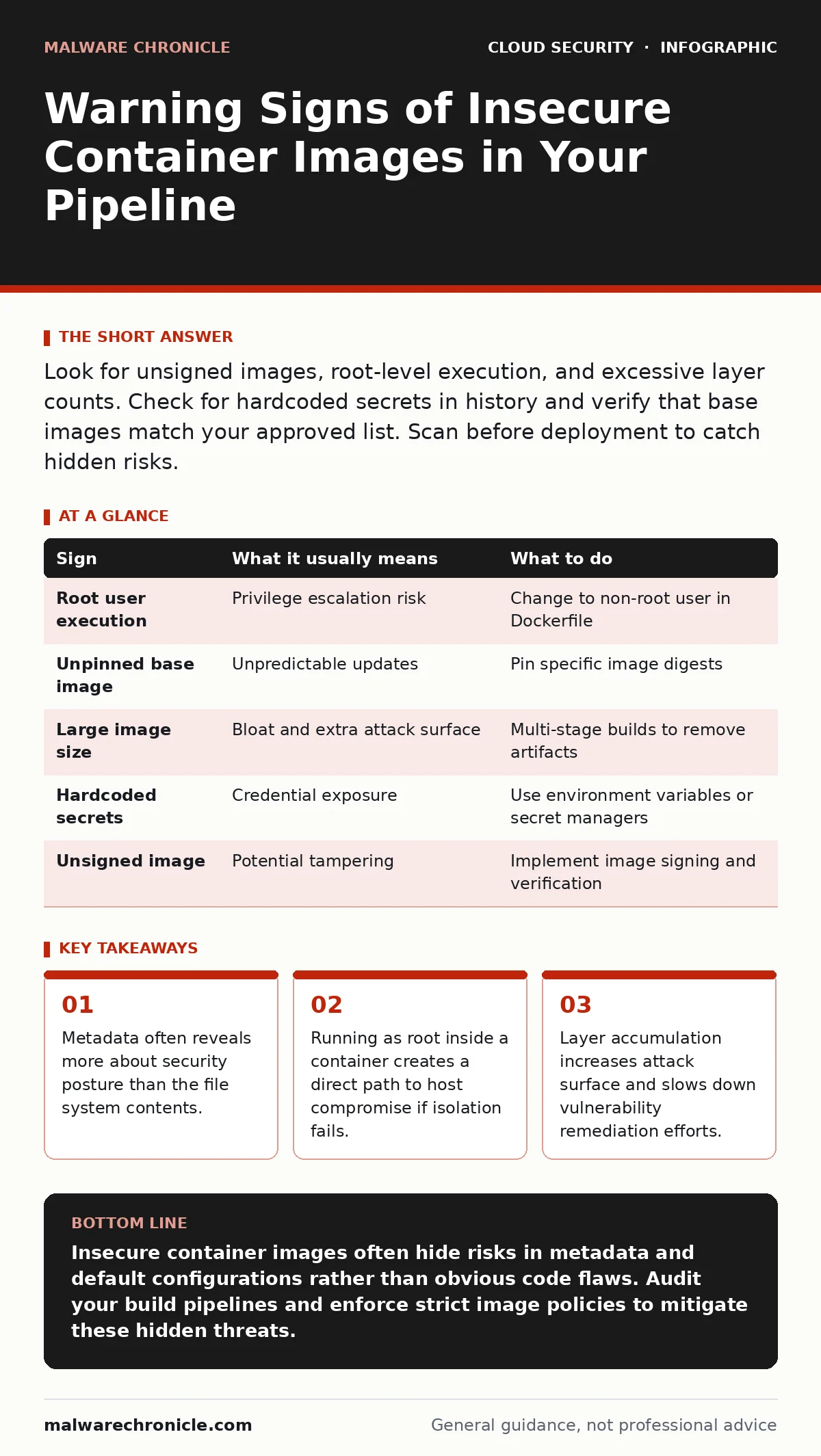
| Sign | What it usually means | What to do |
|---|---|---|
| Root user execution | Privilege escalation risk | Change to non-root user in Dockerfile |
| Unpinned base image | Unpredictable updates | Pin specific image digests |
| Large image size | Bloat and extra attack surface | Multi-stage builds to remove artifacts |
| Hardcoded secrets | Credential exposure | Use environment variables or secret managers |
| Unsigned image | Potential tampering | Implement image signing and verification |
Key takeaways
- Metadata often reveals more about security posture than the file system contents.
- Running as root inside a container creates a direct path to host compromise if isolation fails.
- Layer accumulation increases attack surface and slows down vulnerability remediation efforts.
Insecure container images often hide risks in metadata and default configurations rather than obvious code flaws. Audit your build pipelines and enforce strict image policies to mitigate these hidden threats.
Frequently asked questions
How do I check if a container image contains secrets?
Use image scanning tools that analyze the build history and layers for patterns matching common secret formats.
What is the difference between a pinned and unpinned image?
A pinned image uses a specific digest or version tag, ensuring consistency. An unpinned image uses mutable tags like "latest," which can change unexpectedly.
Can a container escape its isolation?
Yes, if the container runs with excessive privileges or if there is a vulnerability in the container runtime kernel, it may break out to the host system.
Why are multi-stage builds recommended?
They allow you to separate build dependencies from runtime dependencies, resulting in smaller, cleaner images with fewer vulnerabilities.
How this guide was produced: written by the Malware Chronicle editorial team with AI assistance, checked against the public references listed below, and reviewed when the facts change. See our editorial policy or report an error.