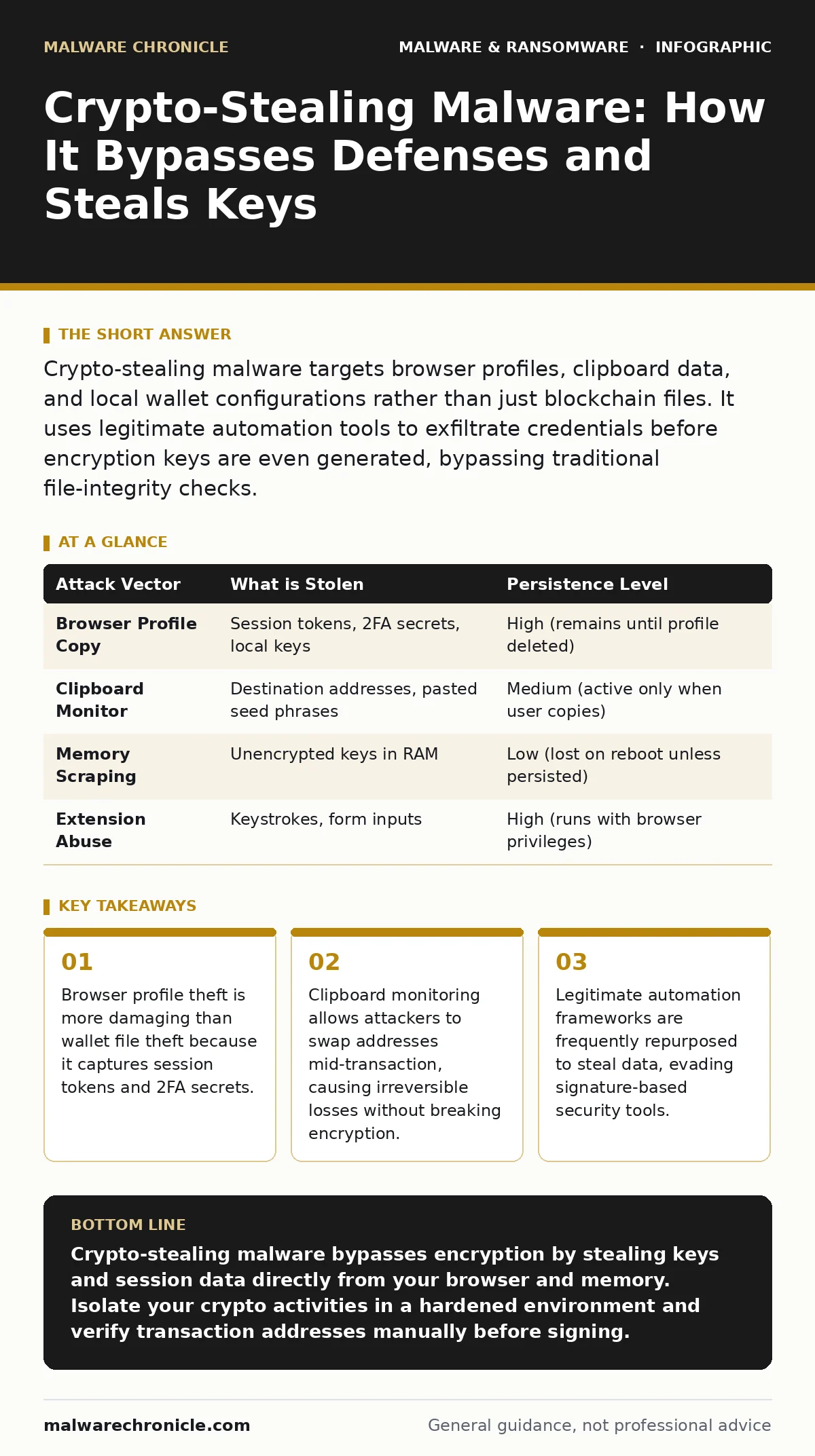
Crypto-stealing malware targets browser profiles, clipboard data, and local wallet configurations rather than just blockchain files. It uses legitimate automation tools to exfiltrate credentials before encryption keys are even generated, bypassing traditional file-integrity checks.
How does crypto-stealing malware actually access my funds?
It rarely cracks your encryption. Instead, it steals the unencrypted private keys or seed phrases from your browser’s local storage, your clipboard, or your memory space. The malware looks for files associated with wallet extensions and copies the entire profile directory. This allows the attacker to import your identity into their own browser, bypassing the need to solve complex cryptographic puzzles.
Why did my antivirus software miss this infection?
Many modern stealers are built using legitimate automation frameworks like PowerShell or Python scripts. These tools are designed to interact with the operating system and browsers, so their behavior looks normal to traditional signature-based scanners. The malware performs actions that a user might also perform, such as reading a file or copying text to the clipboard. This makes heuristic detection less effective because the activity lacks the malicious intent markers that older viruses exhibited.
What is the difference between this and ransomware?
Ransomware encrypts your files to demand payment for their return. Crypto-stealers operate silently to take value without your knowledge, often remaining on your system for weeks. The goal is accumulation, not destruction. While ransomware creates immediate chaos, stealers rely on stealth to drain wallets gradually or in bulk when a large transaction is detected.
Can it steal from hardware wallets?
Direct access to a hardware wallet’s secure element is nearly impossible because the private keys never leave the device. However, the malware can still compromise your security by monitoring your screen or clipboard. If you copy a destination address to paste into your hardware wallet’s transaction confirmation, the malware can swap that address with the attacker’s own. You sign the transaction believing you are sending funds to a friend, but they go to the thief.
How do these tools communicate with the attacker?
The malware uses standard web protocols to send stolen data to remote servers. It often mimics normal HTTPS traffic to blend in with regular browsing activity. This communication channel acts as a command and control server, allowing the attacker to receive the stolen credentials and issue new commands. Because the traffic looks like standard web requests, network firewalls rarely block it unless specific behavioral anomalies are flagged.
See also: Detect Wiper Malware Early: Signals, Logs, and Hidden Blind Spots · Cryptojacking Response: Immediate Steps to Contain and Recover
Why do browser extensions make me vulnerable?
Browser extensions have deep access to your browsing data, including cookies, local storage, and input fields. A malicious extension can read every keystroke you type into a web-based wallet interface. Even legitimate extensions can be compromised or used as a delivery vector for malicious code. Once installed, the extension runs with elevated privileges, allowing it to intercept data before it is encrypted by the website.
Is my data safe if I use a separate browser?
Using a dedicated browser for crypto transactions reduces risk but does not eliminate it. If the malware resides on the host operating system, it can still monitor the clipboard and screen activity across all applications. It can also scan the file system for wallet configuration files regardless of which browser launched the wallet interface. Separation helps, but it assumes the underlying OS is clean, which is often not the case after a phishing click.
How do attackers automate the theft process?
They repurpose open-source automation tools designed for testing software interfaces. These tools can simulate mouse clicks and keyboard inputs to interact with wallet software. By automating the login and export processes, the malware can steal credentials from multiple wallets in minutes. This automation is why you might see multiple wallets drained in a short period after a single infection.
| Attack Vector | What is Stolen | Persistence Level |
|---|---|---|
| Browser Profile Copy | Session tokens, 2FA secrets, local keys | High (remains until profile deleted) |
| Clipboard Monitor | Destination addresses, pasted seed phrases | Medium (active only when user copies) |
| Memory Scraping | Unencrypted keys in RAM | Low (lost on reboot unless persisted) |
| Extension Abuse | Keystrokes, form inputs | High (runs with browser privileges) |
Can I detect this malware by file hash?
Static file hashes in malware detection are ineffective against modern stealers. Attackers modify the code slightly for each victim, changing the hash value while keeping the malicious logic intact. This technique, known as polymorphism, ensures that every infected file has a unique signature. Relying on known bad hashes will miss new variants, as the scanner has never seen that specific version of the code before.
What happens if I reset my wallet password?
Resetting a password on a web-based wallet does not help if the attacker has already stolen your session token or private key from your browser profile. They do not need your password to access your funds if they have the cryptographic keys. The attacker can re-authenticate using the stolen session data, bypassing the password requirement entirely. You must revoke all active sessions and migrate funds to a new wallet with a fresh key pair.
Why do these infections spread so quickly?
They often piggyback on other malware types, such as computer worms that exploit network vulnerabilities or remote access tool abuse where an attacker gains initial control. Once inside, the stealer is deployed as a secondary payload. This multi-stage approach allows attackers to use one method to gain entry and a specialized tool for financial theft. The spread is accelerated by the reuse of stolen credentials across multiple platforms.
How does this relate to other malware families?
While distinct from point-of-sale malware which targets payment terminals, crypto-stealers share similar exfiltration techniques with logic bombs that trigger under specific conditions. Both rely on stealth and precise timing. Understanding the mechanics of one helps in recognizing the patterns of the other, as they all exploit the trust placed in software interfaces and user inputs.
Key takeaways
- Browser profile theft is more damaging than wallet file theft because it captures session tokens and 2FA secrets.
- Clipboard monitoring allows attackers to swap addresses mid-transaction, causing irreversible losses without breaking encryption.
- Legitimate automation frameworks are frequently repurposed to steal data, evading signature-based security tools.
Crypto-stealing malware bypasses encryption by stealing keys and session data directly from your browser and memory. Isolate your crypto activities in a hardened environment and verify transaction addresses manually before signing.
Frequently asked questions
Does offline storage protect me from crypto-stealers?
Yes, if the private keys never touch an internet-connected device. Hardware wallets and paper wallets are immune to remote browser-based theft.
Can I recover stolen cryptocurrency?
No. Blockchain transactions are irreversible. Once funds are moved to an attacker’s wallet, they cannot be retrieved through technical means.
Is using a VPN enough protection?
No. A VPN hides your IP address but does not prevent malware from accessing your local files, clipboard, or browser storage.
How often should I rotate my crypto keys?
Rotate keys immediately after any suspected compromise. For high-value assets, consider regular rotation as a best practice to limit exposure windows.
How this guide was produced: written by the Malware Chronicle editorial team with AI assistance, checked against the public references listed below, and reviewed when the facts change. See our editorial policy or report an error.