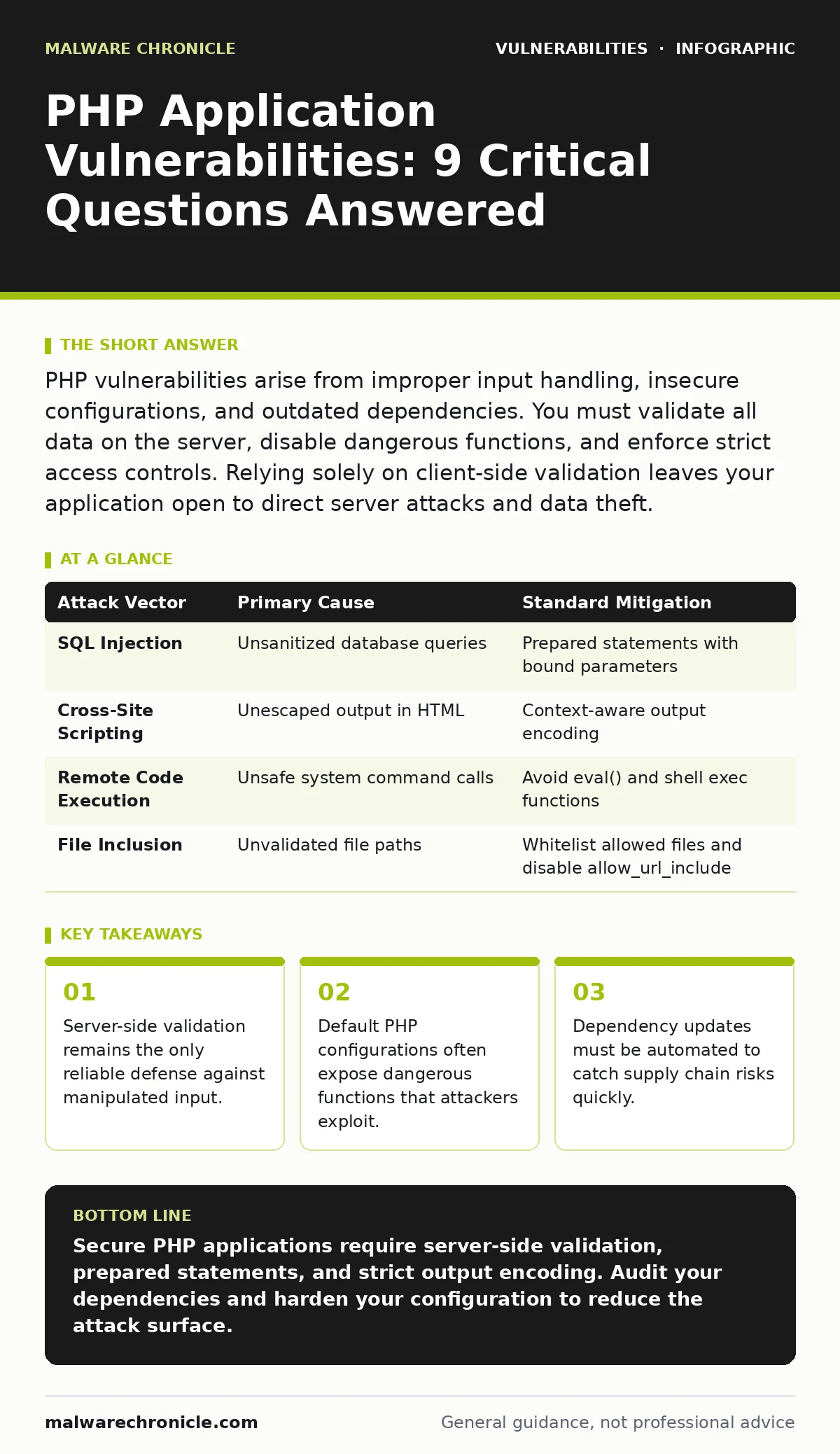
PHP vulnerabilities arise from improper input handling, insecure configurations, and outdated dependencies. You must validate all data on the server, disable dangerous functions, and enforce strict access controls. Relying solely on client-side validation leaves your application open to direct server attacks and data theft.
How does PHP handle untrusted input safely?
PHP treats all incoming data as untrusted by design, but the developer must enforce this boundary. You must validate and sanitize every variable from $_GET, $_POST, $_COOKIE, and $_SERVER before using it. Client-side JavaScript validation is purely for user experience and can be bypassed entirely. Server-side logic must re-verify data types, lengths, and formats. Use prepared statements for database queries to prevent injection. This separation ensures that even if a user manipulates the HTML form, the server rejects malformed data before it reaches your business logic.
Why do prepared statements stop SQL injection?
Prepared statements separate SQL code from data values, preventing the database engine from interpreting input as executable commands. When you use PDO or MySQLi prepared statements, the database parses the SQL structure first. Then, it binds your data as literal values. This means a string like ' OR 1=1 is treated as text, not as a logical condition. Without this separation, an attacker can alter the query structure to dump entire tables or modify records. Prepared statements are the standard defense because they remove the ambiguity between code and data at the database level.
What causes remote code execution in PHP?
Remote code execution occurs when user input is passed directly to system commands or interpreted as PHP code. Functions like exec(), system(), or eval() are dangerous because they execute arbitrary strings. If you pass unsanitized input to these functions, an attacker can run shell commands on your server. This allows them to read files, install backdoors, or pivot to other systems. You must avoid these functions entirely. If you must run external processes, use a whitelist of allowed arguments and never pass user input directly to the shell. See our guide on wormable vulnerabilities for details on how these exploits spread rapidly across networks.
How do I prevent cross-site scripting attacks?
Cross-site scripting happens when your application outputs unescaped user data into HTML. Browsers cannot distinguish between your static HTML and injected JavaScript. You must encode output based on context. For HTML bodies, use htmlspecialchars() with the ENT_QUOTES flag. For JavaScript blocks, use JSON encoding or attribute escaping. For URLs, encode special characters to prevent fragment injection. Context-aware encoding ensures that special characters like < and > are converted to safe entities. This breaks the script tag syntax, rendering the attack harmless. Consistent encoding across all output points is the only way to mitigate this risk effectively.
| Attack Vector | Primary Cause | Standard Mitigation |
|---|---|---|
| SQL Injection | Unsanitized database queries | Prepared statements with bound parameters |
| Cross-Site Scripting | Unescaped output in HTML | Context-aware output encoding |
| Remote Code Execution | Unsafe system command calls | Avoid eval() and shell exec functions |
| File Inclusion | Unvalidated file paths | Whitelist allowed files and disable allow_url_include |
Why is file inclusion a critical risk?
Local and remote file inclusion vulnerabilities allow attackers to include arbitrary files in your application logic. This often happens when you use variables to determine which file to load. If an attacker controls that variable, they can point it to a sensitive file like /etc/passwd or a malicious script hosted elsewhere. This can lead to information disclosure or full system compromise. You must disable allow_url_include in your PHP configuration. Use a strict whitelist of allowed filenames rather than dynamic paths. This prevents the application from loading files outside the intended directory structure.
How do session management flaws expose users?
Session hijacking occurs when an attacker steals or predicts a session ID. PHP generates these IDs, but default settings may be predictable or insecure. You must use secure, HttpOnly cookies to store session IDs. This prevents JavaScript from accessing the cookie, stopping cross-site scripting theft. Set the Secure flag to ensure cookies are only sent over HTTPS. Regenerate session IDs after login to prevent fixation attacks. Implement timeout logic to destroy inactive sessions. These measures ensure that even if an attacker intercepts traffic, they cannot reuse the session to impersonate a user.
What role do dependencies play in security?
Third-party libraries often contain known vulnerabilities that your application inherits. If you use an outdated version of a package, you expose your application to attacks that have already been solved. You must regularly update dependencies and verify their integrity. Use tools like static application security testing (SAST) to scan your codebase for known issues in libraries. Automate this process in your CI/CD pipeline. Do not ignore minor version updates, as they often contain critical security fixes. Supply chain attacks frequently target these dependencies to compromise downstream applications silently.
How can I secure my PHP configuration?
Default PHP settings prioritize compatibility over security. You must harden your php.ini file. Disable dangerous functions like exec, system, and shell_exec using disable_functions. Set display_errors to off in production to prevent leaking sensitive stack traces to attackers. Restrict file upload limits and types. Use open_basedir to confine PHP scripts to specific directories. These changes reduce the attack surface significantly. Regularly review your configuration against security advisories to ensure you are not missing new best practices. See our guide on silent security patches to understand how vendors often fix these issues without fanfare.
Why is input validation not enough?
Validation checks if data meets expected criteria, but it does not sanitize malicious content. An attacker can bypass validation rules by using encoded or obfuscated payloads. You must combine validation with sanitization and output encoding. Validation rejects bad data at the entry point. Sanitization cleans data before storage. Output encoding protects data when it is displayed. Relying on only one layer creates gaps. Defense in depth requires multiple checks at different stages of the data lifecycle. This approach ensures that even if one layer fails, the next one catches the threat.
Key takeaways
- Server-side validation remains the only reliable defense against manipulated input.
- Default PHP configurations often expose dangerous functions that attackers exploit.
- Dependency updates must be automated to catch supply chain risks quickly.
Secure PHP applications require server-side validation, prepared statements, and strict output encoding. Audit your dependencies and harden your configuration to reduce the attack surface.
Frequently asked questions
Does PHP 8 fix all security vulnerabilities?
No. PHP 8 improves performance and syntax but does not automatically fix application-level logic flaws. Developers must still write secure code and manage dependencies.
How often should I update PHP versions?
Update when critical security patches are released. Delaying updates leaves your application exposed to known exploits that attackers actively target.
Can I use a firewall to stop PHP attacks?
A web application firewall can block common patterns but cannot replace secure coding. It is an additional layer, not a substitute for proper validation and encoding.
What is the most common PHP mistake?
Trusting user input without server-side validation. This leads to injection attacks that bypass client-side checks and compromise data integrity.
How this guide was produced: written by the Malware Chronicle editorial team with AI assistance, checked against the public references listed below, and reviewed when the facts change. See our editorial policy or report an error.